Animal Transfer & Space Availability Management
Animal Transfer & Space Availability Management
Centralizing Regulatory Request Intake
Preventing $200k+ in Annual Facility Waste Through Smarter Space Visibility
Preventing $200k+ in Annual Facility Waste Through Smarter Space Visibility
Client
Regeneron
Regeneron
My Role
Lead Product Designer, Business Analyst
Lead Product Designer, Business Analyst
Tools
Figma, Lucidcharts, Claude
OVERVIEW
$200k+ Lost. Space Was the Culprit.
$200k+ Lost. Space Was the Culprit.
$200k+ Lost. Space Was the Culprit.
Regeneron's animal facility had a costly blind spot, no one could see which cage space was actually available or track what was coming in and out without chasing emails across disconnected systems.
I partnered with a Business Analyst to design a centralized operational dashboard giving Scientists and Vet Services a single source of truth for space availability and animal transfer management.
Regeneron's animal facility had a costly blind spot, no one could see which cage space was actually available or track what was coming in and out without chasing emails across disconnected systems.
I partnered with a Business Analyst to design a centralized operational dashboard giving Scientists and Vet Services a single source of truth for space availability and animal transfer management.
✅ Real-time space visibility enables VetServices to identify and reclaim space occupied by animals without active experiments
✅ Real-time space visibility enables VetServices to identify and reclaim space occupied by animals without active experiments
✅ Replaced reactive email coordination by a single, unified planning interface
✅ Replaced reactive email coordination by a single, unified planning interface
✅ Hundreds of thousands saved (Projected) in preventable annual facility costs
✅ Hundreds of thousands saved (Projected) in preventable annual facility costs
My role & impact
As Lead Product Designer, I owned end-to-end design, from stakeholder sessions to development-ready prototypes in a 2-week sprint.
As Lead Product Designer, I owned end-to-end design, from stakeholder sessions to development-ready prototypes in a 2-week sprint.

PROBLEM
The Cost of Not Knowing What's in Your Own Facility
The Cost of Not Knowing What's in Your Own Facility
The Cost of Not Knowing What's in Your Own Facility
Animals were occupying cage space with no active experiments running. Incoming deliveries were being scheduled with no reliable way to confirm space was actually free.
Animals were occupying cage space with no active experiments running. Incoming deliveries were being scheduled with no reliable way to confirm space was actually free.
❌ Data fragmented across VelociView, Animal Census, and email threads
❌ Data fragmented across VelociView, Animal Census, and email threads
❌ Data fragmented across VelociView, Animal Census, and email threads
❌ Space conflicts discovered after animals were already in transit
❌ Space conflicts discovered after animals were already in transit
❌ Reactive email coordination with no shared visibility
❌ Reactive email coordination with no shared visibility
❌ No single view of what was reserved, occupied, or open in a room
❌ No single view of what was reserved, occupied, or open in a room
Research
Compressed Discovery
Under a 2-Week Constraint
Compressed Discovery
Under a 2-Week Constraint
Compressed Discovery
Under a 2-Week Constraint
Constraint: A 2-week timeline ruled out a traditional research phase. I built on one of the BA's prior stakeholder interviews and ran my own design validation session to test assumptions before any hi-fi work began.
I interviewed a key stakeholder who worked directly alongside both user groups. Then we collaborated and developed personas below.
Constraint: A 2-week timeline ruled out a traditional research phase. I built on one of the BA's prior stakeholder interviews and ran my own design validation session to test assumptions before any hi-fi work began.
I interviewed a key stakeholder who worked directly alongside both user groups. Then we collaborated and developed personas below.

Design
One View. Two Teams. Zero Guesswork.
One View. Two Teams. Zero Guesswork.
One View. Two Teams. Zero Guesswork.
Working iteratively with the BA and a key stakeholder, I designed a split-view operational dashboard that consolidates everything both teams need to make decisions.
I used Claude to generate initial layout explorations and component variations, then refined and validated the strongest directions in Figma through stakeholder review.
Working iteratively with the BA and a key stakeholder, I designed a split-view operational dashboard that consolidates everything both teams need to make decisions.
I used Claude to generate initial layout explorations and component variations, then refined and validated the strongest directions in Figma through stakeholder review.
Exploring the Rack Component
Exploring the Rack Component
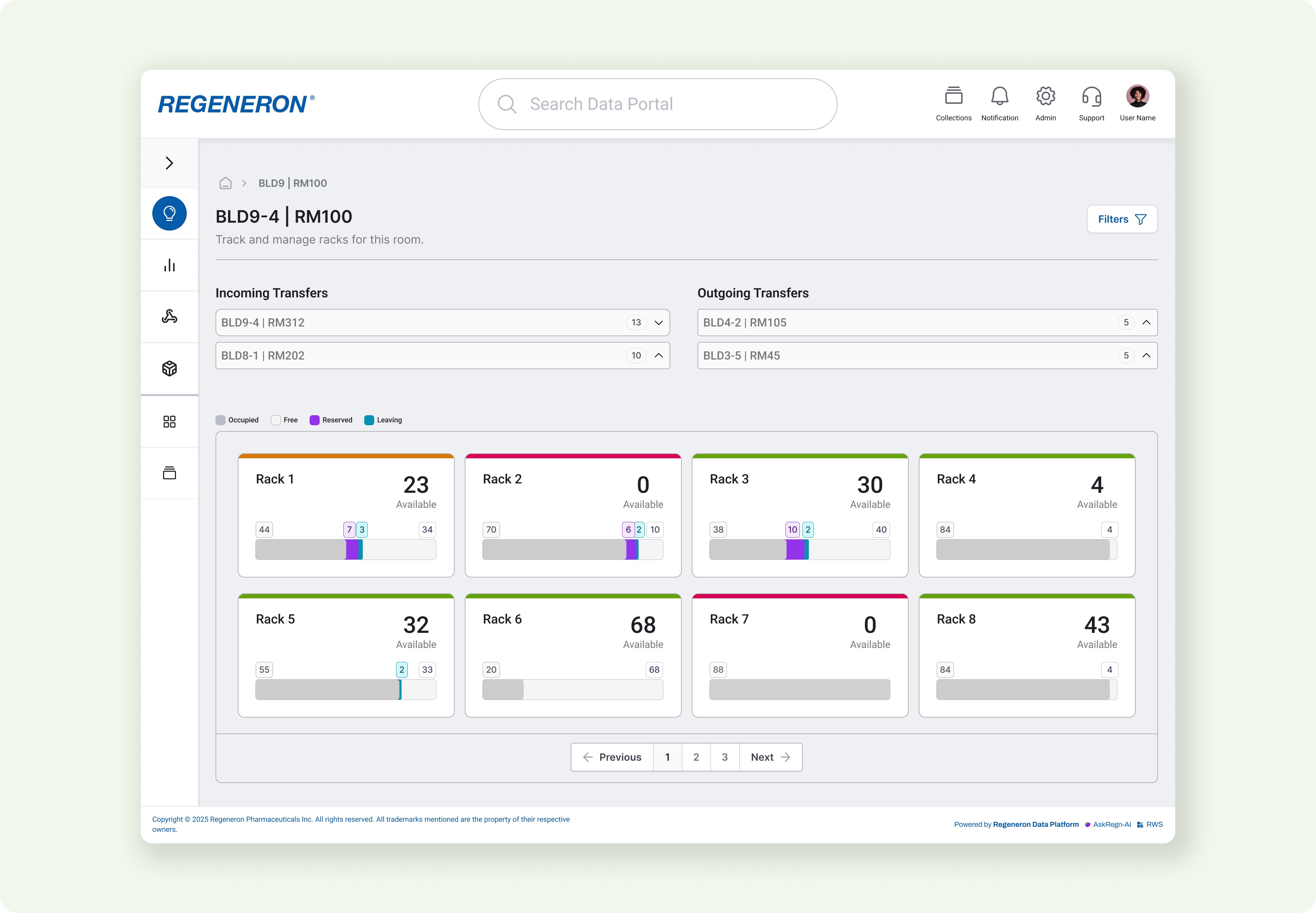
The rack component was the centerpiece of the dashboard, but it had to communicate a lot at once: how full each rack was, how many cages were occupied, reserved, or leaving, and how much space was actually available.
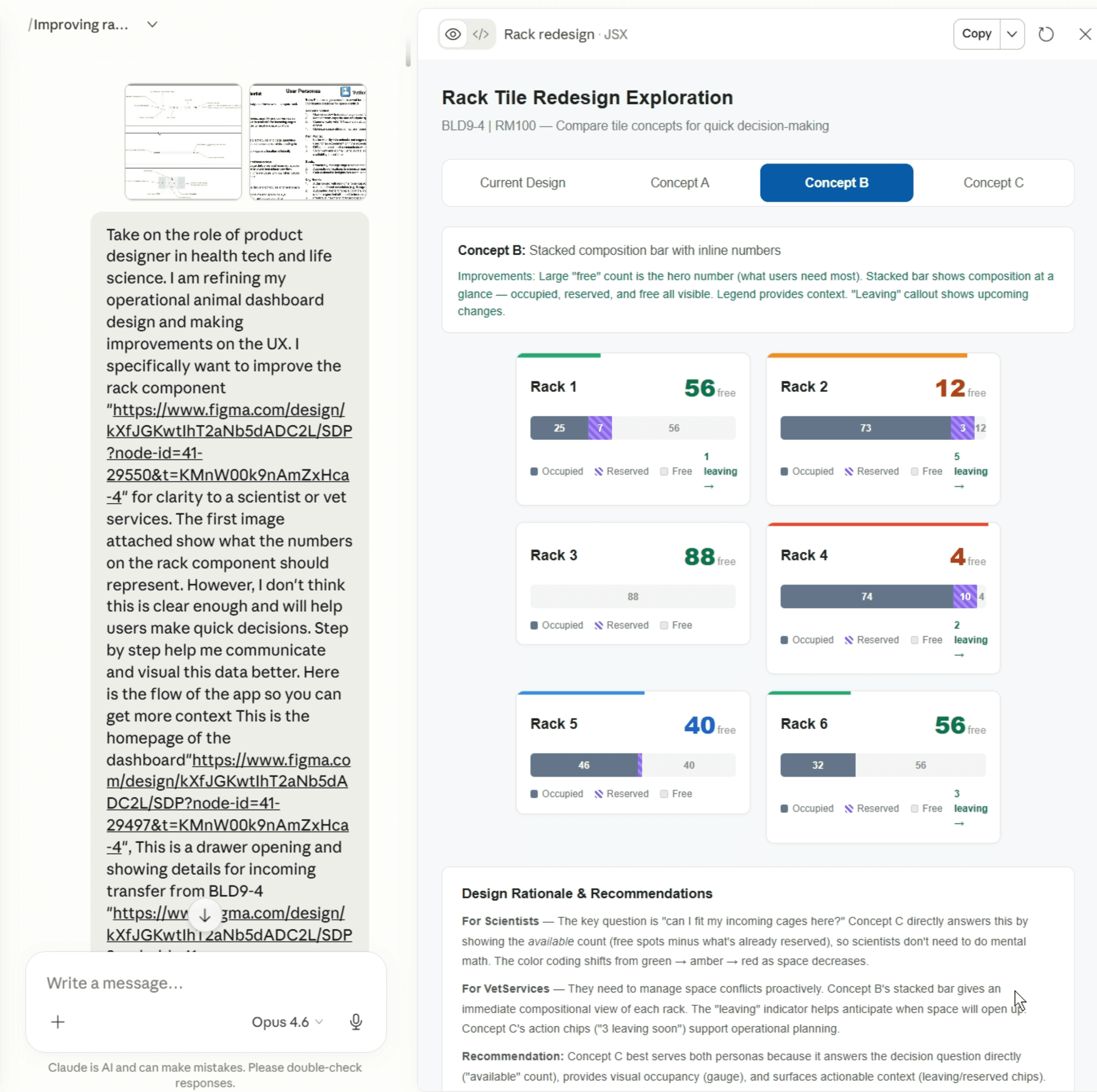
I used Claude to rapidly generate variations on how to display this data — stacked bars, composition charts, and different ways to indicate fullness — so I could compare approaches side-by-side instead of committing to one direction prematurely.
I pulled the strongest ideas from those explorations and refined the final direction with another product designer.
The rack component was the centerpiece of the dashboard, but it had to communicate a lot at once: how full each rack was, how many cages were occupied, reserved, or leaving, and how much space was actually available.
I used Claude to rapidly generate variations on how to display this data — stacked bars, composition charts, and different ways to indicate fullness — so I could compare approaches side-by-side instead of committing to one direction prematurely.
I pulled the strongest ideas from those explorations and refined the final direction with another product designer.
Scene 1 — Operational Dashboard
"How much space do I actually have?"
Scene 1 — Operational Dashboard
"How much space do I actually have?"
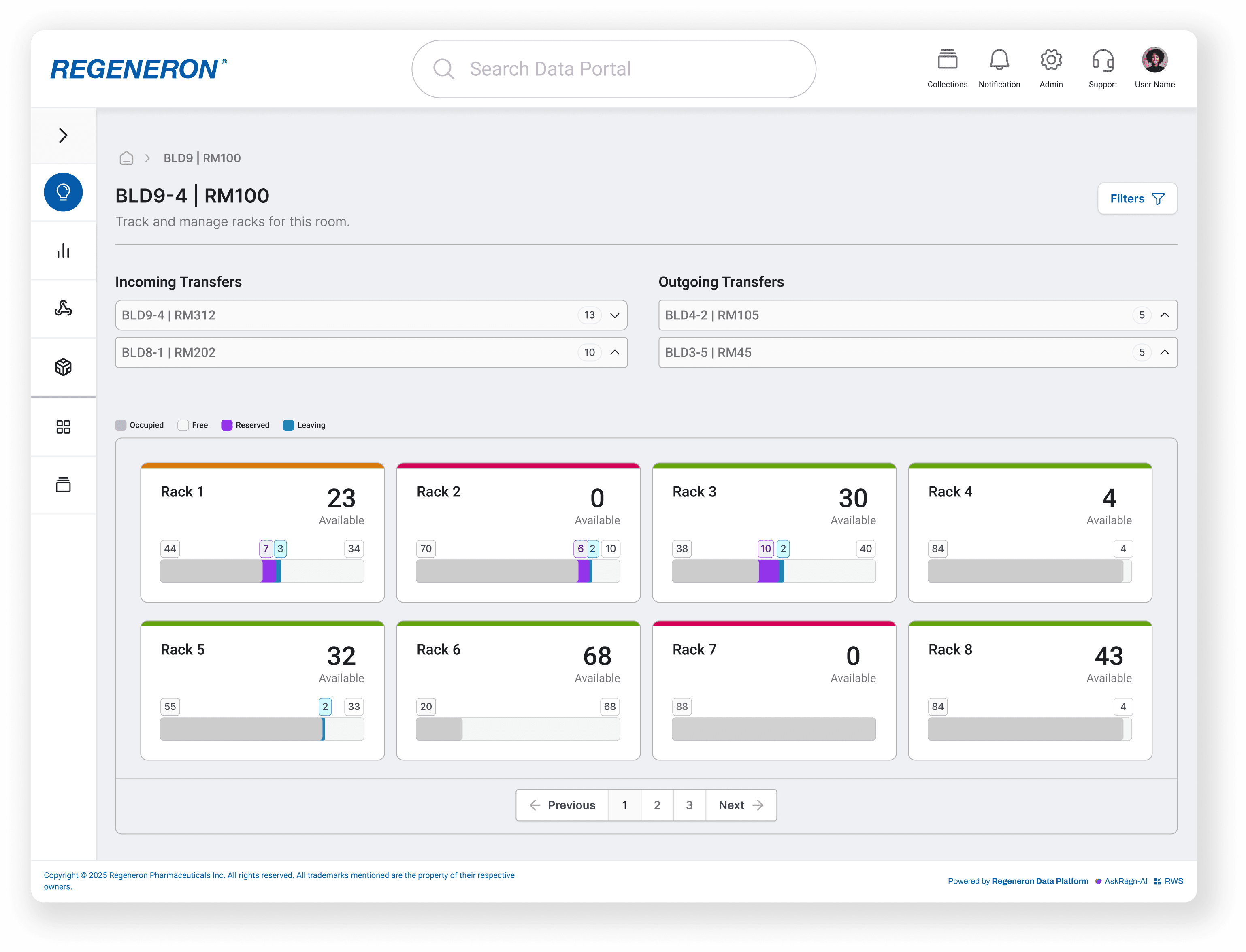
What we designed: A split-view dashboard with Incoming and Outgoing Transfers at the top and a grid of rack tiles below. Each rack tile communicates fullness, cage status, and available space at a glance.
Design Decisions
▸ Balanced color palette for the legend — Scientists had previously given feedback that bright, saturated UI overwhelmed them. I pulled muted colors from the design system for the Occupied / Free / Reserved / Leaving legend so the rack grid stays readable even when scanning dozens of tiles at once.
▸ Colored fullness bar on top of each rack — A single horizontal bar above each tile signals capacity at a glance: green = 0–60% full (lots of available space), yellow = 61–85% full (starting to fill up), red = 86–100% full (limited or no space). Users can read the entire grid for capacity in one pass without parsing numbers.
▸ Numbers above the bar instead of inside it — Earlier versions buried cage counts (leaving, reserved, occupied) inside the bar itself, which made them hard to read. Surfacing the numbers above the bar made the data immediately digestible and kept the bar focused on its job: showing fullness.
▸ One large "Available" number in the corner — The single most important question users ask is "How much room do I have?" The available count is the hero number on each tile, sized prominently so users can scan a row of racks and immediately spot where space exists. The bar provides the visual context if they need to drill in.
What we designed: A split-view dashboard with Incoming and Outgoing Transfers at the top and a grid of rack tiles below. Each rack tile communicates fullness, cage status, and available space at a glance.
Design Decisions
▸ Balanced color palette for the legend — Scientists had previously given feedback that bright, saturated UI overwhelmed them. I pulled muted colors from the design system for the Occupied / Free / Reserved / Leaving legend so the rack grid stays readable even when scanning dozens of tiles at once.
▸ Colored fullness bar on top of each rack — A single horizontal bar above each tile signals capacity at a glance: green = 0–60% full (lots of available space), yellow = 61–85% full (starting to fill up), red = 86–100% full (limited or no space). Users can read the entire grid for capacity in one pass without parsing numbers.
▸ Numbers above the bar instead of inside it — Earlier versions buried cage counts (leaving, reserved, occupied) inside the bar itself, which made them hard to read. Surfacing the numbers above the bar made the data immediately digestible and kept the bar focused on its job: showing fullness.
▸ One large "Available" number in the corner — The single most important question users ask is "How much room do I have?" The available count is the hero number on each tile, sized prominently so users can scan a row of racks and immediately spot where space exists. The bar provides the visual context if they need to drill in.
Scene 2 — Incoming Transfer Card with Decision Support
"Where should these cages actually go?"
Scene 2 — Incoming Transfer Card with Decision Support
"Where should these cages actually go?"
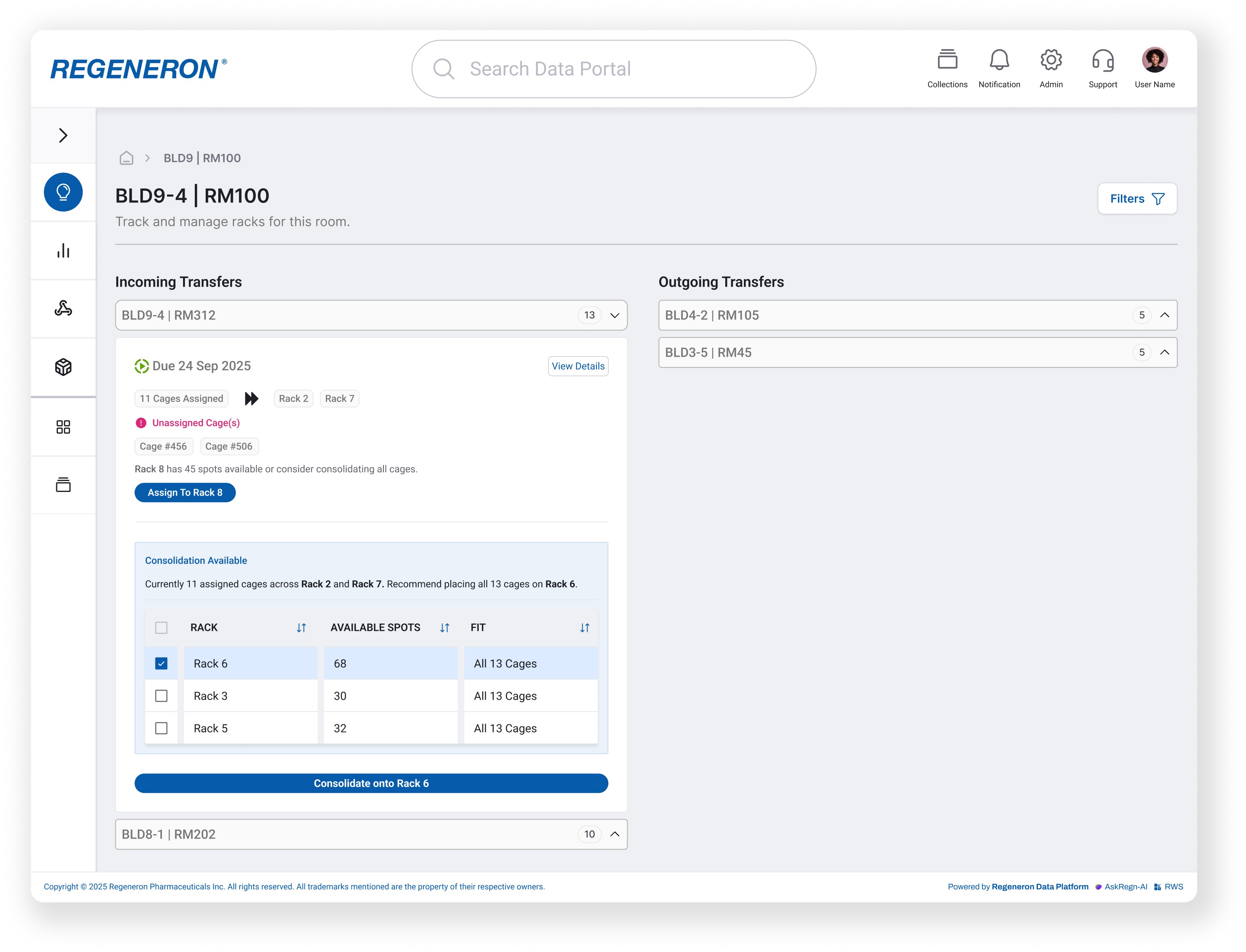
What we designed: An expandable Incoming Transfer card that surfaces unassigned cages, recommends where to place them, and offers a one-click consolidation option. Instead of forcing Scientists to mentally calculate capacity across racks, the system does the lookup and surfaces the best option, they just confirm or over ride.
Design Decisions
▸ Unassigned cages surfaced at the top with a warning indicator — Cages without a rack assignment are the single biggest source of last-minute scrambling. I pulled them above the fold with an alert dot and "Unassigned Cage(s)" label so Scientists can't miss them when opening the card. The alert color is pulled from the design system to keep the visual language consistent with other warning states across the platform.
▸ Two clear paths: quick assign or consolidate — "Assign to Rack 8" handles the simple case (just place the unassigned cages). The Consolidation Available panel handles the bigger move (regroup all 13 cages onto a single rack). Splitting these into two distinct CTAs prevents users from accidentally triggering the wrong action.
▸ Pre-selected best option with override — I designed this concept with help from Claude to explore how the system could reduce decision fatigue. Rack 6 is checked by default because it has the best fit, and the primary CTA reads "Consolidate onto Rack 6." Users can swap to a different rack with one click, but the default path is the optimal one.
▸ Fit column makes capacity explicit — The consolidation table includes a "Fit" column showing whether all 13 cages will actually land on a given rack. Available spots alone aren't enough context — users need to know the entire transfer will fit before they commit.
What we designed: An expandable Incoming Transfer card that surfaces unassigned cages, recommends where to place them, and offers a one-click consolidation option. Instead of forcing Scientists to mentally calculate capacity across racks, the system does the lookup and surfaces the best option, they just confirm or over ride.
Design Decisions
▸ Unassigned cages surfaced at the top with a warning indicator — Cages without a rack assignment are the single biggest source of last-minute scrambling. I pulled them above the fold with an alert dot and "Unassigned Cage(s)" label so Scientists can't miss them when opening the card. The alert color is pulled from the design system to keep the visual language consistent with other warning states across the platform.
▸ Two clear paths: quick assign or consolidate — "Assign to Rack 8" handles the simple case (just place the unassigned cages). The Consolidation Available panel handles the bigger move (regroup all 13 cages onto a single rack). Splitting these into two distinct CTAs prevents users from accidentally triggering the wrong action.
▸ Pre-selected best option with override — I designed this concept with help from Claude to explore how the system could reduce decision fatigue. Rack 6 is checked by default because it has the best fit, and the primary CTA reads "Consolidate onto Rack 6." Users can swap to a different rack with one click, but the default path is the optimal one.
▸ Fit column makes capacity explicit — The consolidation table includes a "Fit" column showing whether all 13 cages will actually land on a given rack. Available spots alone aren't enough context — users need to know the entire transfer will fit before they commit.
Scene 3 — Date Range Filtering
"What's coming up this week?
Scene 3 — Date Range Filtering
"What's coming up this week?
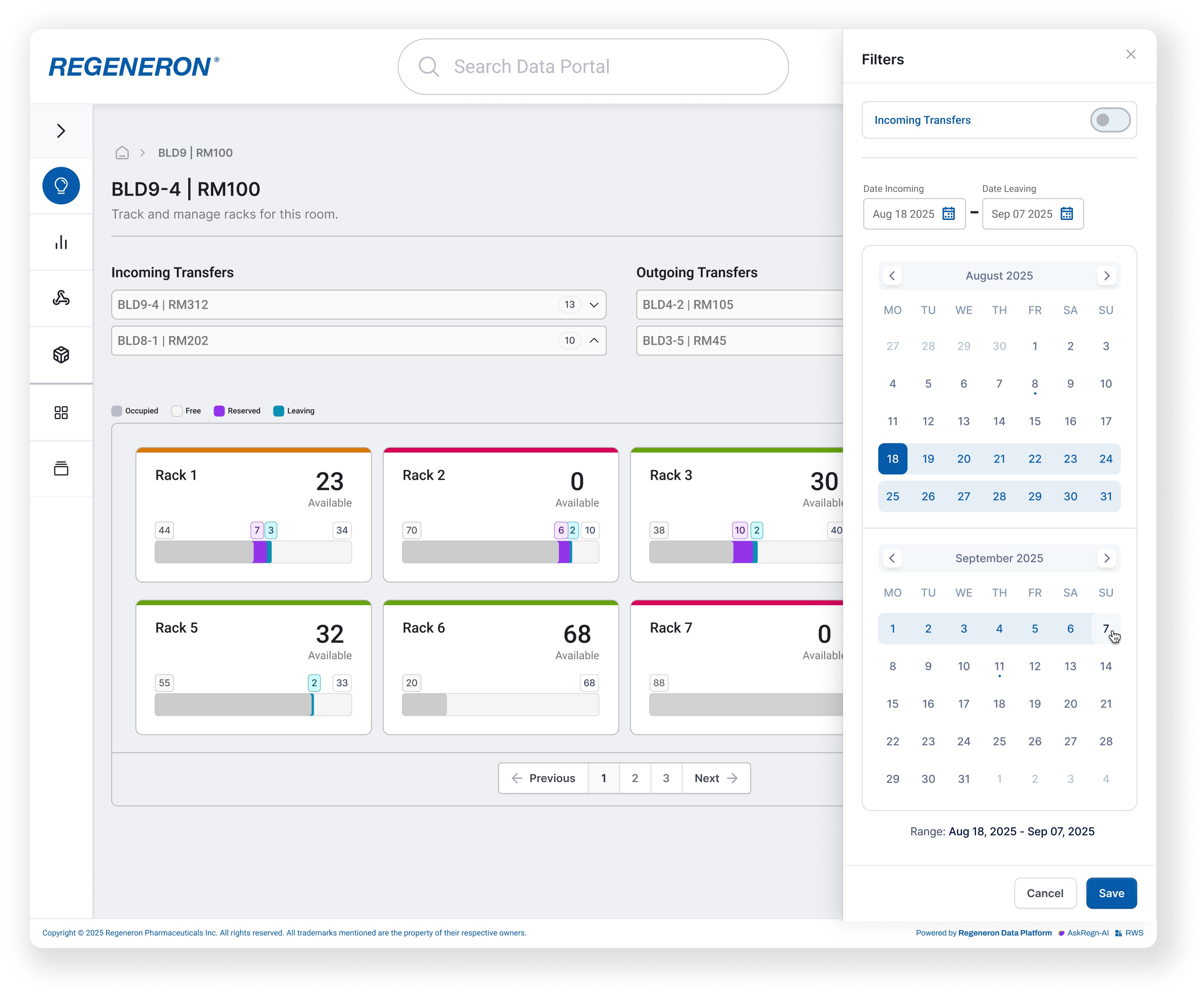
What we designed: A date range filter that lets users narrow the dashboard to a specific time window both the transfer lists and the rack grid update together. Instead of scanning every transfer and every rack in the room, users can pull up just what's coming up this week and start planning against it.
Design Decisions
▸ Date range filters both the transfer lists and the rack grid — When a user applies a date range, both the Incoming/Outgoing transfer sections and the rack tiles below filter together. Filtering only one would leave the other half of the screen showing stale or irrelevant data, which would undercut the "single source of truth" the dashboard is built around.
▸ Filters off by default — The dashboard opens with everything visible. Pre-filtering would risk hiding transfers users need to see, and forcing a date range on first load adds friction to the most common entry path. Users opt in to filtering when they have a specific planning task in mind.
▸ Drawer pattern from the design system — Filters live in a slide-out drawer pulled directly from the design system, with the calendar picker component used elsewhere across the platform. This keeps the main dashboard uncluttered and reuses interaction patterns users already know from other tools in the data portal.
What we designed: A date range filter that lets users narrow the dashboard to a specific time window both the transfer lists and the rack grid update together. Instead of scanning every transfer and every rack in the room, users can pull up just what's coming up this week and start planning against it.
Design Decisions
▸ Date range filters both the transfer lists and the rack grid — When a user applies a date range, both the Incoming/Outgoing transfer sections and the rack tiles below filter together. Filtering only one would leave the other half of the screen showing stale or irrelevant data, which would undercut the "single source of truth" the dashboard is built around.
▸ Filters off by default — The dashboard opens with everything visible. Pre-filtering would risk hiding transfers users need to see, and forcing a date range on first load adds friction to the most common entry path. Users opt in to filtering when they have a specific planning task in mind.
▸ Drawer pattern from the design system — Filters live in a slide-out drawer pulled directly from the design system, with the calendar picker component used elsewhere across the platform. This keeps the main dashboard uncluttered and reuses interaction patterns users already know from other tools in the data portal.
Design Summary
Design Summary
Design Summary
The prototype was approved for development. The next step is engineering build, followed by direct user validation with Scientists and Vet Services once the tool is in their hands.
The prototype was approved for development. The next step is engineering build, followed by direct user validation with Scientists and Vet Services once the tool is in their hands.
RESULTS
What was delivered
What was delivered
This project has not yet launched. The outcomes below reflect validated design decisions and projected operational impact.
This project has not yet launched. The outcomes below reflect validated design decisions and projected operational impact.
✅ Projected savings of hundreds of thousands annually in preventable facility costs by making occupied-but-inactive cage space visible and reclaimable addressing a problem that previously had no system-level visibility
✅ Replaced reactive email coordination with a structured, role-specific workflow — reducing the communication overhead required to plan transfers and confirm space availability
✅ Consolidated 3 disconnected systems into a single planning interface eliminating the need to cross-reference tools before making space decisions
✅ Two distinct persona workflows served by one interface Scientists and Vet Services each had a clear entry point and task flow within the same dashboard, confirmed as intuitive during stakeholder walkthrough
✅ Projected savings of hundreds of thousands annually in preventable facility costs by making occupied-but-inactive cage space visible and reclaimable addressing a problem that previously had no system-level visibility
✅ Replaced reactive email coordination with a structured, role-specific workflow — reducing the communication overhead required to plan transfers and confirm space availability
✅ Consolidated 3 disconnected systems into a single planning interface eliminating the need to cross-reference tools before making space decisions
✅ Two distinct persona workflows served by one interface Scientists and Vet Services each had a clear entry point and task flow within the same dashboard, confirmed as intuitive during stakeholder walkthrough