Designing a Unified Pipeline Health Dashboard
Designing a Unified Pipeline Health Dashboard
Centralizing Regulatory Request Intake
Solving Regeneron's Inability to Monitor Immunization Pipeline Health
Solving Regeneron's Inability to Monitor Immunization Pipeline Health
Client
Regeneron
Regeneron
My Role
Product Designer
Product Designer
Tools
Figma, Lucidcharts, Claude
OVERVIEW
From Manual Reports to
a Single Operational Surface.
From Manual Reports to
a Single Operational Surface.
From Manual Reports to
a Single Operational Surface.
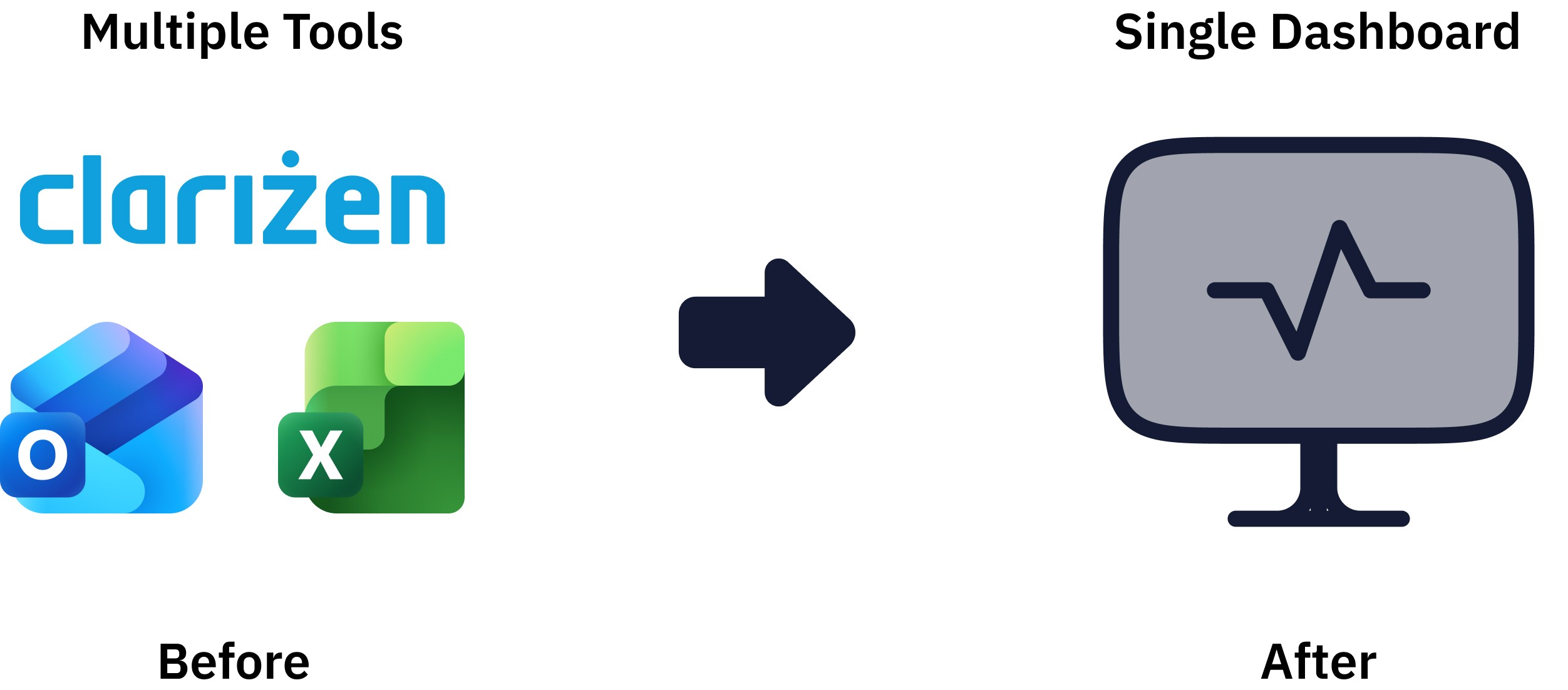
Regeneron's immunization pipeline spans concurrent projects. Regulatory Project Management Leads, the operational owners of project health had no live view of what was in flight, stuck, or stale. They pulled reports from Clarizen, cross-referenced spreadsheets, and chased SMEs by email before every weekly pipeline review.
I helped design a unified operational dashboard that replaces this manual workflow with a decision-ready surface for the RPM Lead.
Regeneron's immunization pipeline spans concurrent projects. Regulatory Project Management Leads, the operational owners of project health had no live view of what was in flight, stuck, or stale. They pulled reports from Clarizen, cross-referenced spreadsheets, and chased SMEs by email before every weekly pipeline review.
I helped design a unified operational dashboard that replaces this manual workflow with a decision-ready surface for the RPM Lead.
My role & impact
I was one of three product designers on a cross-functional team tasked with replacing Regeneron's fragmented, multi-tool reporting workflow with a single operational surface. I led the design of two scenes that resolve the RPM Lead's core questions: What needs attention right now? and is this stall real, or just data lag? Moving the team from manual weekly reports to a live, decision-ready view.
Specifically, I accomplished this by:
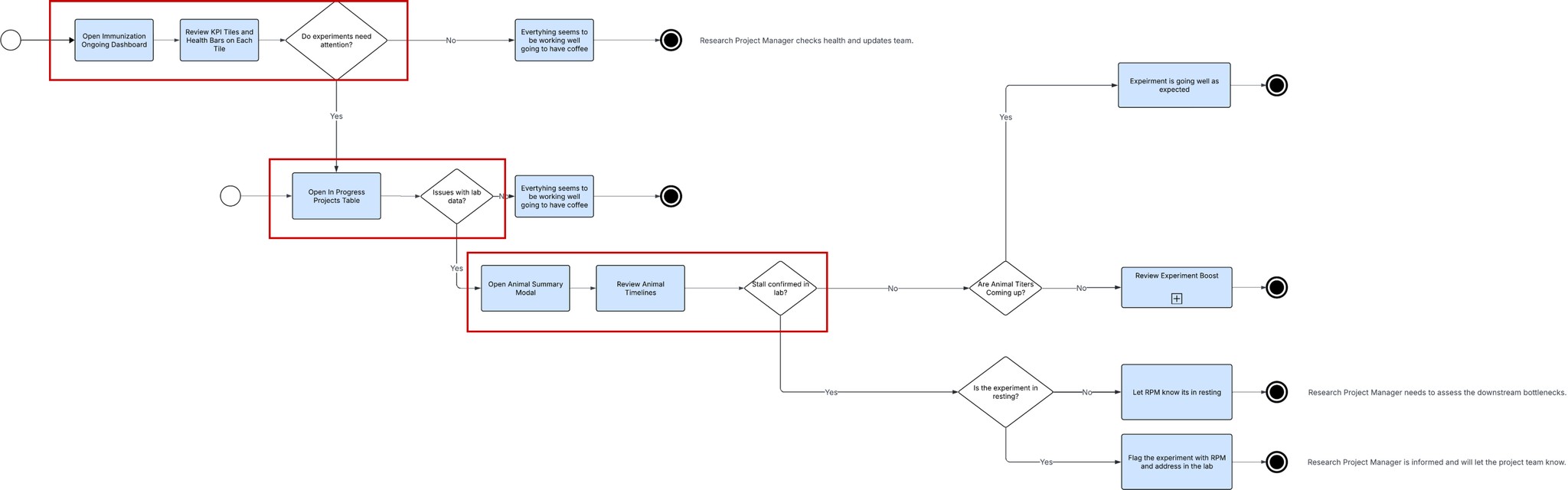
Building a task flow with the BA and an SME to align on the RPM Lead's decision logic — before any UI was drawn
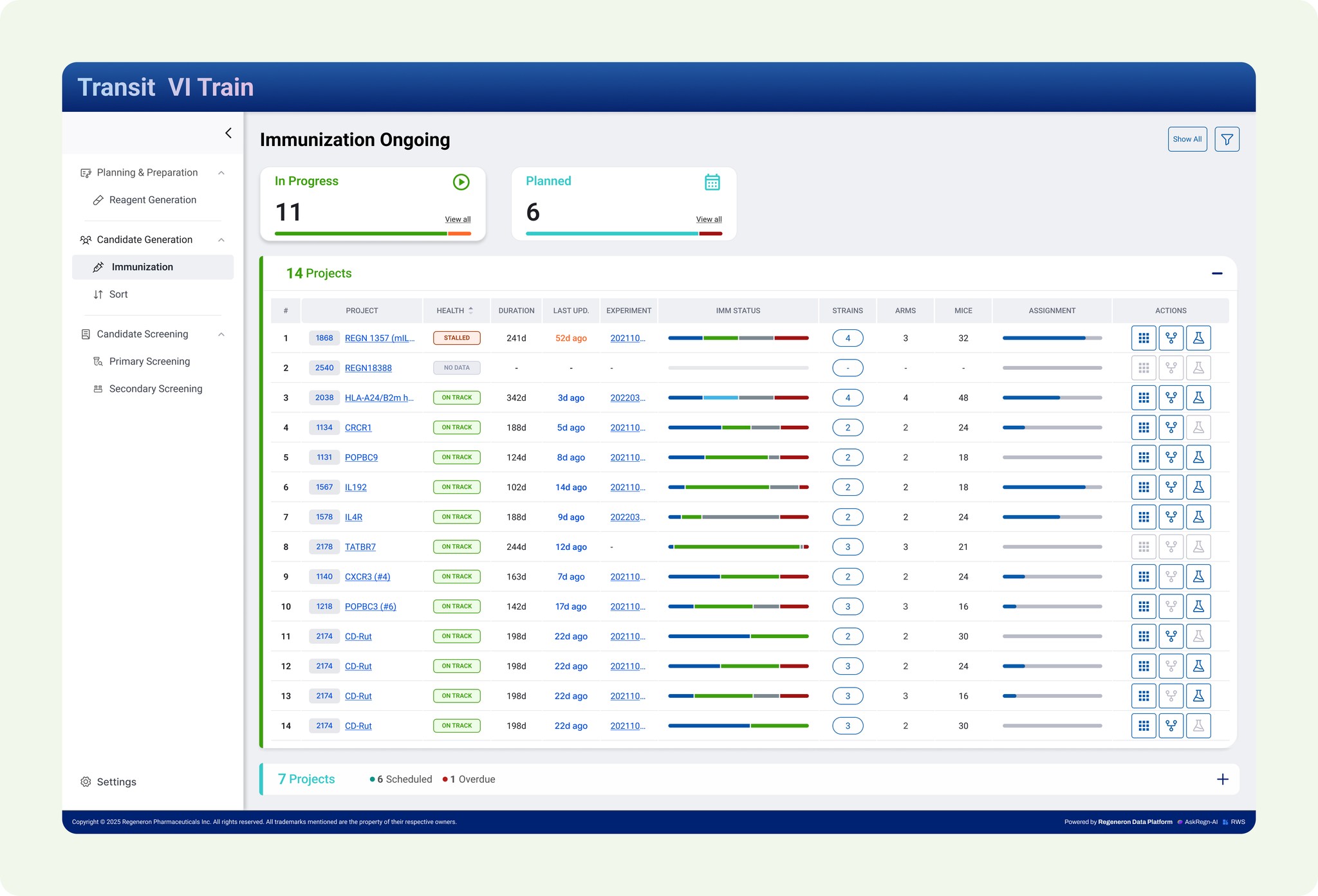
Co-designing the Immunization Ongoing Dashboard with another product designer, surfacing portfolio health in a sub-minute scan
Owning the Animal Summary and Strain Timeline end-to-end the surface where RPM Leads confirm whether a stall is real or just data lag
I was one of three product designers on a cross-functional team tasked with replacing Regeneron's fragmented, multi-tool reporting workflow with a single operational surface. I led the design of two scenes that resolve the RPM Lead's core questions: What needs attention right now? and is this stall real, or just data lag? Moving the team from manual weekly reports to a live, decision-ready view.
Specifically, I accomplished this by:
Building a task flow with the BA and an SME to align on the RPM Lead's decision logic — before any UI was drawn
Co-designing the Immunization Ongoing Dashboard with another product designer, surfacing portfolio health in a sub-minute scan
Owning the Animal Summary and Strain Timeline end-to-end the surface where RPM Leads confirm whether a stall is real or just data lag
PROBLEM
Weekly Pipeline Reviews Were
Running on Stale, Hand-Built Data.
Weekly Pipeline Reviews Were
Running on Stale, Hand-Built Data.
Weekly Pipeline Reviews Were
Running on Stale, Hand-Built Data.
Regeneron's immunization pipeline runs 30+ concurrent projects, and weekly leadership reviews depend on knowing which ones are healthy, which are stalled, and where to redirect resources. But the operational data needed to answer that question lived across Clarizen, spreadsheets, and SME inboxes.
Regeneron's immunization pipeline runs 30+ concurrent projects, and weekly leadership reviews depend on knowing which ones are healthy, which are stalled, and where to redirect resources. But the operational data needed to answer that question lived across Clarizen, spreadsheets, and SME inboxes.
❌ No live portfolio view — RPM Leads rebuilt pipeline state from Clarizen exports, spreadsheets, and SME emails before every weekly review
❌ No live portfolio view — RPM Leads rebuilt pipeline state from Clarizen exports, spreadsheets, and SME emails before every weekly review
❌ No live portfolio view — RPM Leads rebuilt pipeline state from Clarizen exports, spreadsheets, and SME emails before every weekly review
❌ Data lag looked like science problems — a project with no recent lab events could be genuinely stalled or just missing logged updates, with no way to tell from the dashboard
❌ Data lag looked like science problems — a project with no recent lab events could be genuinely stalled or just missing logged updates, with no way to tell from the dashboard
❌ Data lag looked like science problems — a project with no recent lab events could be genuinely stalled or just missing logged updates, with no way to tell from the dashboard
❌ No visibility into team capacity — RPM Leads couldn't answer whether the In Progress count was sustainable against team bandwidth without manual investigation
❌ No visibility into team capacity — RPM Leads couldn't answer whether the In Progress count was sustainable against team bandwidth without manual investigation
Research
No primary user research was conducted by the design team. The BA produced a journey map before handoff to the design team.
The journey map helped us to empathize with the user. It highlighted how we needed to quickly visualize critical data such as data gaps and issues with the pipeline. This helped us to start iterating on components like KPI cards and tables that will assist the users in their investigation.
No primary user research was conducted by the design team. The BA produced a journey map before handoff to the design team.
The journey map helped us to empathize with the user. It highlighted how we needed to quickly visualize critical data such as data gaps and issues with the pipeline. This helped us to start iterating on components like KPI cards and tables that will assist the users in their investigation.

Design
Two Scenes, One Decision Pattern.
Two Scenes, One Decision Pattern.
Two Scenes, One Decision Pattern.
I collaborated with another product designer on the Immunization Ongoing Dashboard with another product designer and owned the Animal Summary & Strain Timeline end-to-end. Each scene maps directly to a stage in the RPM Lead's task flow: read the portfolio at the row level, then confirm at the animal level only when needed.
I used Claude to generate initial layouts and component variations, then refined them in Figma through feedback sessions with the BA and another product designer.
I collaborated with another product designer on the Immunization Ongoing Dashboard with another product designer and owned the Animal Summary & Strain Timeline end-to-end. Each scene maps directly to a stage in the RPM Lead's task flow: read the portfolio at the row level, then confirm at the animal level only when needed.
I used Claude to generate initial layouts and component variations, then refined them in Figma through feedback sessions with the BA and another product designer.
Scene 1 — Immunization Ongoing Dashboard
"How healthy is the portfolio right now?"
Co-designed with another Product Designer
Scene 1 — Immunization Ongoing Dashboard
"How healthy is the portfolio right now?"
Co-designed with another Product Designer
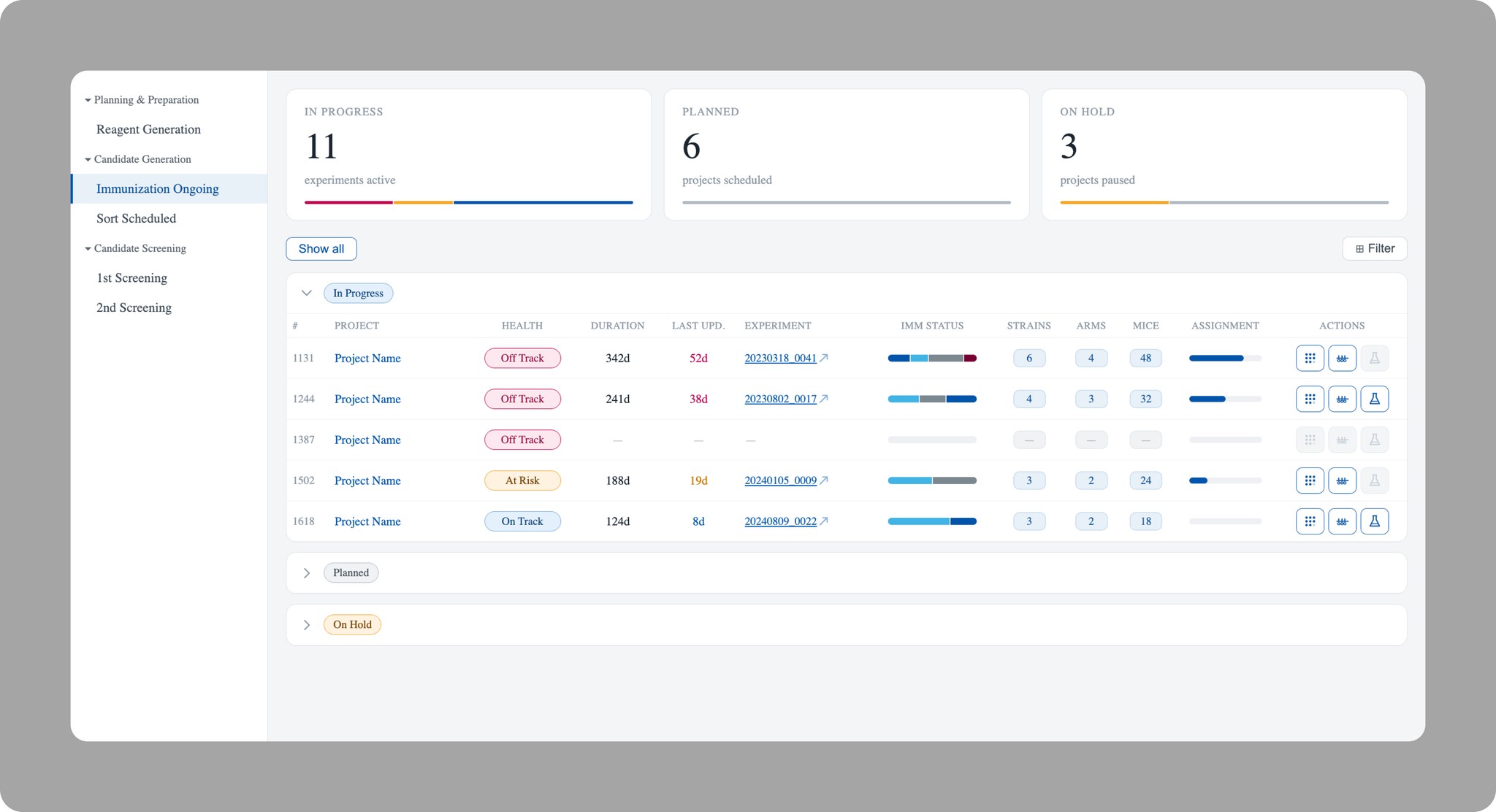
Used Claude to come up with the initial concept and build out this workflow.
Used Claude to come up with the initial concept and build out this workflow.
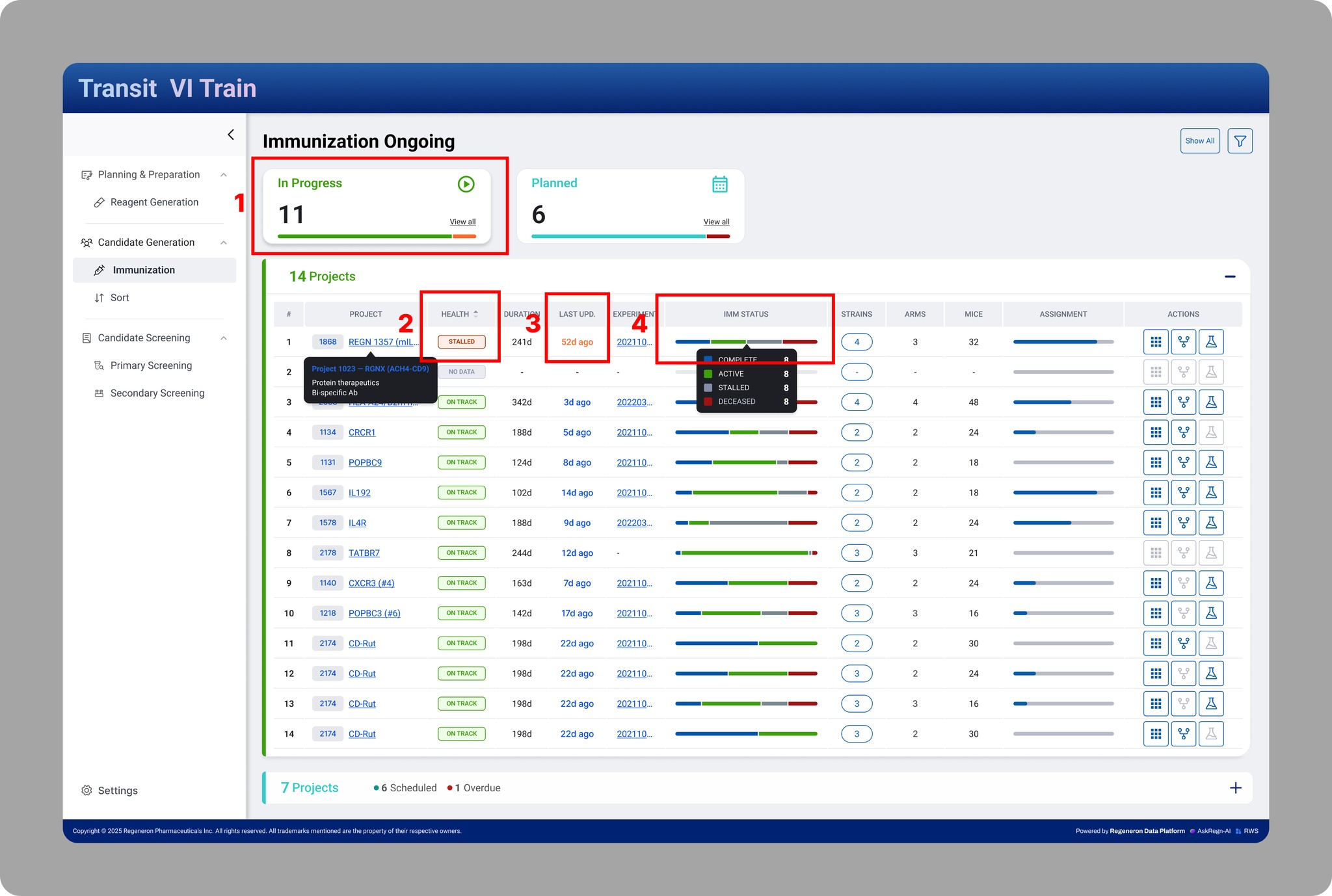
What we designed: KPI tiles surfacing In Progress / Planned / On Hold counts with proportional health bars, paired with a dense queue table showing Health badge, Last Updated, IMM Status, and quick actions per campaign.
Design Decisions
1. KPI title with health bar— the health bar immediately indicates to the RPM projects need to be investigated.
2. Health badge sits first after project name — the single most important signal that investigation is needed on a specific project.
3. "Last Upd." in days with color the RPM Lead instantly sees what's been ignored or potentially stalled.
4. IMM Status bar — compact distribution of Complete · Active · Stalled · Deceased animals lets the RPM Lead compare row-to-row without opening anything.
What we designed: KPI tiles surfacing In Progress / Planned / On Hold counts with proportional health bars, paired with a dense queue table showing Health badge, Last Updated, IMM Status, and quick actions per campaign.
Design Decisions
1. KPI title with health bar— the health bar immediately indicates to the RPM projects need to be investigated.
2. Health badge sits first after project name — the single most important signal that investigation is needed on a specific project.
3. "Last Upd." in days with color the RPM Lead instantly sees what's been ignored or potentially stalled.
4. IMM Status bar — compact distribution of Complete · Active · Stalled · Deceased animals lets the RPM Lead compare row-to-row without opening anything.
Scene 2 — Animal Summary & Strain Timeline
"Is this stall real, or just data lag?"
Scene 2 — Animal Summary & Strain Timeline
"Is this stall real, or just data lag?"
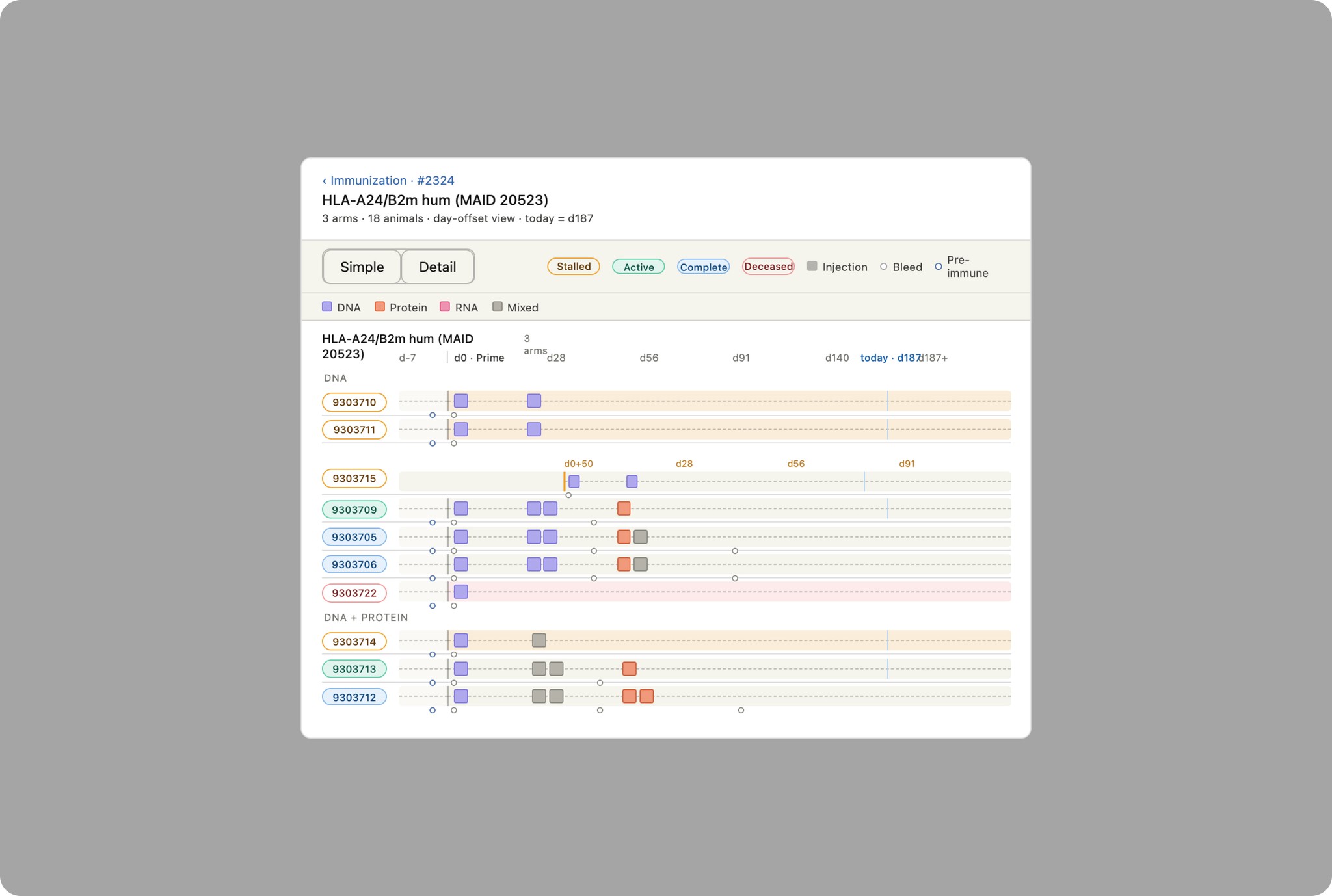
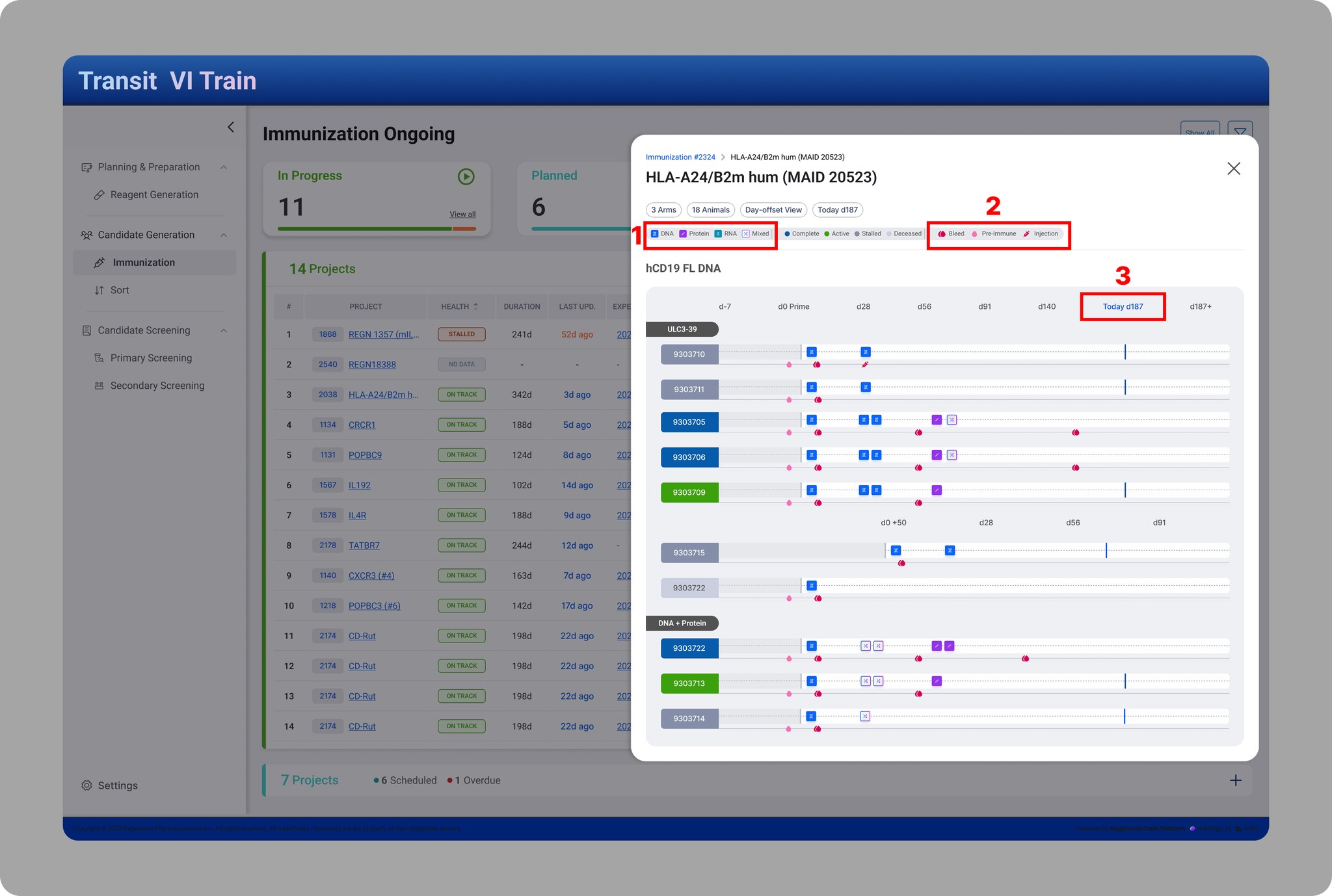
What I designed: A modal with per-animal timelines showing injection events, bleed milestones, pre-immune markers, and stall indicators on a day-offset axis. Animals grouped by immunogen type (DNA, Protein, RNA, Mixed), color-coded by status.
Design Decisions
1. Day-offset axis instead of calendar dates — lets the RPM Lead compare strains that started at different times on a common scale
2. Icon-based event encoding — RPM Leads consume large volumes of data daily; icons cut cognitive load on repeat scans
3. "Today" marker (d187) anchors the timeline to the current moment — animals past expected milestones are immediately visible
What I designed: A modal with per-animal timelines showing injection events, bleed milestones, pre-immune markers, and stall indicators on a day-offset axis. Animals grouped by immunogen type (DNA, Protein, RNA, Mixed), color-coded by status.
Design Decisions
1. Day-offset axis instead of calendar dates — lets the RPM Lead compare strains that started at different times on a common scale
2. Icon-based event encoding — RPM Leads consume large volumes of data daily; icons cut cognitive load on repeat scans
3. "Today" marker (d187) anchors the timeline to the current moment — animals past expected milestones are immediately visible
Design Summary
Design Summary
Design Summary
Two scenes, one decision pattern: read at the portfolio level, confirm at the animal level. Both surfaces validated with the BA and SME against the original task flow before engineering handoff. Next: production build and the first measured signal of whether RPM Leads adopt the workflow as designed.
Two scenes, one decision pattern: read at the portfolio level, confirm at the animal level. Both surfaces validated with the BA and SME against the original task flow before engineering handoff. Next: production build and the first measured signal of whether RPM Leads adopt the workflow as designed.
RESULTS
What was delivered
What was delivered
This project is in active development. Outcomes reflect design alignment and stakeholder validation, not production metrics.
This project is in active development. Outcomes reflect design alignment and stakeholder validation, not production metrics.
Business Outcomes
✅ Replaces manual, multi-tool reporting (Clarizen + spreadsheets + email) used before each weekly review
✅ Live health view across 30+ concurrent immunization projects
✅ Project moved into Figma build phase with engineering after stakeholder alignment
UX Outcomes
✅ Tool consolidation — one surface replaces a workflow that previously spanned Clarizen exports, spreadsheet cross-referencing, and SME email chains. The number of context switches required for a weekly portfolio read dropped from 5 to one.
✅ State coverage — the design handles 3 health states (On Track · At Risk · Stalled), 4 animal status states (Complete · Active · Stalled · Deceased), and the lab-stall vs. data-gap distinction surfaced explicitly through the Animal Summary modal. Data quality is treated as a first-class design concern, not a happy-path afterthought.
✅ Workflow validation — the read → scan → act pattern from the BA's journey map was preserved through hi-fi, with the task flow serving as the alignment artifact between BA, SME, and design before any UI was built.
Business Outcomes
✅ Replaces manual, multi-tool reporting (Clarizen + spreadsheets + email) used before each weekly review
✅ Live health view across 30+ concurrent immunization projects
✅ Project moved into Figma build phase with engineering after stakeholder alignment
UX Outcomes
✅ Tool consolidation — one surface replaces a workflow that previously spanned Clarizen exports, spreadsheet cross-referencing, and SME email chains. The number of context switches required for a weekly portfolio read dropped from 5 to one.
✅ State coverage — the design handles 3 health states (On Track · At Risk · Stalled), 4 animal status states (Complete · Active · Stalled · Deceased), and the lab-stall vs. data-gap distinction surfaced explicitly through the Animal Summary modal. Data quality is treated as a first-class design concern, not a happy-path afterthought.
✅ Workflow validation — the read → scan → act pattern from the BA's journey map was preserved through hi-fi, with the task flow serving as the alignment artifact between BA, SME, and design before any UI was built.